This past term, after a few years of saying I will do it, I finally got some learners to write letters to children in another country AND sent the letters. Two things happened in June that made this possible, three months later: 1) I met some very willing partners at ISTE (hey, there is a theme going through a few of these posts, isn't there?) and 2) My team back in New Zealand also wanted to connect with other schools. Having the support on both sides proved crucial in getting this off the ground.
Part of the reason I wanted to do this was that all too often, writing is done for the sake of writing. I wanted to give my learners a chance to write for a purpose (in this case, communicating with someone and fostering a long-distance friendship, maybe), and to connect with children around the world.
So as a whole habitat, we did a lesson early in the term on writing letters and all of our children wrote a draft (albeit, none of them actually had set buddies at the time). I was able to work out through one of my ISTE connections 11 learners in the US (North Dakota to be exact) who could receive letters. So a week or so ago, I had my 11 learners write their good drafts, filled an envelope and sent them off. I've gotten word that they arrived (thank goodness my handwriting wasn't TOO bad!) and the responses will come back shortly. I'm pretty excited for that. Here are the letters that my learners have written:
One of the biggest difficulties in this whole thing was arranging buddies. Some of my fellow learning coaches had some schools to write to, and some of them fell through. I was only able to (currently) connect with one other classroom (though I am still in talks with some others at a school in North Carolina). I think though, that I'm going to continue to be persistent. I'm still looking for some buddies, so if anyone is looking for some pen pal buddies (anywhere in the world), leave a comment here or a DM on twitter and I'll get back to you!
One of the connections that I made at ISTE 2017 was with the Global Collaboration Network and some of its members (thanks to a night of karaoke). A few weeks ago I was sent this tweet:
I was interested in making some more global connections, so I clicked on the link. Having heard a lot about Flipgrid recently but not really being sure of what it was, I decided to give this one a go and changed up my reading plan last minute to read the book (by watching the video below) and having my learners respond to it.
To be honest, while I really liked the book and its message, I was a bit confused as to what my learners were meant to do. Being in New Zealand, we had started looking at this on Monday, which is Sunday in the US, so there had not yet been any entries to the flipgrid yet. So we bumbled about what we were doing for a few days. I had the children make a picture about how they would make their mark in the world. What was interesting was that even though I didn't really give them that great instructions, they all interpreted differently and had some really interesting things to say:
The actual use of Flipgrid was interesting. Essentially there was an online board setup where anyone could post videos (though many of the other videos had a lot of filters on them, which didn't really seem useful) and respond to the videos with videos of their own. My impression beforehand was that this was a tool for flipping a classroom, but obviously the potential of this is far beyond that. Some of my learners did receive some feedback from others and while it wasn't necessarily very deep, it was interesting to see them connect with others around the globe. I like this idea and perhaps I can use it with some upcoming projects I'm trying to plan with some schools overseas. It definitely has the potential to help learners connect with each other.
It is not a completely free resource (though it does have a free version), so I have to do some checking to see if I can get by with the free version, but certainly it is something worth checking out. Global Collaboration, on the other hand, is something I definitely recommend!
This week was Maori Language Week in New Zealand. Though I have always tried my best to learn about all things Maori since I've lived in New Zealand, this year I have been lucky enough to be teaching with Bev Aerenga who has helped me expand my horizons and I felt like I've been able to contribute in a lot of ways this year.
The first thing I did this week was help put a spotlight on some successful Maori citizens. As a Canadian who has not only lived in a multicultural society most of my life but who also went through teacher training there, where a main focus was on multiculturalism, I sometimes felt that ethnicities were reduced to songs, dances, music and food. I wanted to highlight some Maori people who had had success outside of these areas. So we each chose a person and made a short slide to highlight them each day. To be honest, I like the concept, though I'm not so sure my execution was great. Yes, we did share some people, but I'm not entirely sure the concept sunk it. It will give me some more thoughts for next year - though again, hopefully one does not wait a whole year to highlight successful Maori people. Here are the slides that we created for our learners:
Another thing that our habitat did (admittedly, I was not the driving force behind this, but I did support) was prepare a waiata for the whole school Waiata Sing Off. Our learners worked so hard to learn the words and the actions. I may be biased, but I think they were the best habitat at the sing-off. Here's what they did:
The third and fourth things we did this week involved me making some digital resources. Our school had our termly Curious Community Day, so I created a couple of Kahoot! quizzes (unfortunately, you can't really embed or share them, but if you look for my user name, mrdavidson, you'll find the two I made) as well as a digital breakout. I love using breakout and this was a chance for me to make my own. I thought the clues were quite simple and straightforward, but clearly they were difficult. Most of the learners at Ormiston who tried the breakout gave up before they even solved one clue. I do know, however, that after sharing this with the New Zealand Primary Teachers' Facebook group, that several other schools did attempt it and some were even successful.
If you want to have a look at it, the picture below links to the breakout. I won't give any clues, so you'll have to try it for yourself. But I can say that you don't need anything but what's there to figure it out.
I actually had a lot of fun making this breakout (and the Kahoot! quizzes). My plan now is to work on another breakout (I've actually already started it) on New Zealand elections and the electoral system, so hopefully I can get that done in time for the run-up to the upcoming election. Probably best to check my twitter if you want to see that one...
It's definitely been a good week for me in that I've become a lot more comfortable with teaching these things and creating resources. I can attribute that to having a nurturing and helpful semi-mentor working alongside me in my habitat. So thanks Bev! And I'm looking forward to continuing this journey.
Three times before I have applied for the Google Innovator Academy and three times I have received the rejection email with varying degrees of dismay. But each time I refused to give up, knowing that if I kept at it, I would be selected. That being said, I was still quite nervous for this current round, since it was in my part of the world.
I was not to be dismayed this time. While on vacation in New York City, I had a flurry of activity on my phone, which all indicated that I had been accepted. I was extremely busy at the time so it took a while for everything to sink it. After my holiday, I came back to a very busy school term, so was also quite rushed for time. That being said, I still managed to get everything done in time for the academy, which was probably one of the best experiences I've ever had.
If I had to choose what my favourite part of the two and a half days, I'd have a real problem. Pretty much all of it was incredible. The best I can do is point out two aspects of the academy that will likely be instrumental in going forward: The connections with other innovative educators around the globe and the design thinking process.
With me at the academy were 36 other educators, and many coaches and other EdTech experts. My close team, the Lucky Unkos made immediate and strong bonds with each other, and functioned not only as a well-oiled machine in all the activities we did, but also ended up winning quite a few things (or coming close seconds). By going through the process together, we formed something of a family group together and will now have each other to lean on through difficult times. One of my good online (and in person) colleagues was actually placed in this group, so it was nice to have that, but it was also nice to work closely with others in this capacity.
The whole point of the academy was to help each of us work on an identified problem in education and to develop a solution to it through the design process. Though I had had some experience with this, clearly I didn't know enough, because over the 2 and a half days I was immersed into the world of design thinking in a way that I could never have imagined. We started from the beginning by looking at all of the reasons why the problem exists and then examining the person (or people) to whom our solution is directed at. We spent lots of time slowly developing our ideas and giving each other feedback. Eventually we all developed a prototype of what our solution will be.
This process was absolutely amazing and I've already brought in many of the ideas into my practice. In our iExplore block, I've taken four of my groups and run through a watered down (but still pretty robust) version of this with the projects they had been working on. Already the results have been pretty positive with all four groups working on some pretty interesting solutions (so watch this space in the coming weeks when I'll have time to share what they did in more depth).
My actual project is based on helping educators integrate coding into the curriculum. Here in New Zealand, computational thinking is meant to be part of the curriculum next year. Before the academy I did a survey and found that many educators were not teaching it (about 50%) and those that were had had very little training or support. So I wanted to change that. After the whole process at the academy, I decided on making a storyboard of a video for my prototype. I'm currently in the process of turning that storyboard into a script which will then be filmed. It has been a busy few weeks since I came back (mostly taken up with ERO and some big personal things), so I'm hopefully going to find some time in the coming week to work on it. At any rate, I was matched with my mentor today, so that's another great step in this whole process. I look forward to sharing with everyone how this project is going in the future!
So once again I made the trip across the Pacific to the US of A to ISTE. After the first time over, it was hard not to make the trek again. There simply is nothing like it (at least that I've been to) over on this side of the world. This year, I felt like a veteran, knowing the best way to get the most for my time in San Antonio. I wanted to avoid wasting time listening to people talk at me and make some real connections with real people doing amazing things. I also had a long list of ISTE friends to reconnect with. A lot of people go to conferences to hear the latest new thing (and I definitely like learning about that stuff), but connections are more valuable to me, with some really innovative, off the wall ideas thrown in there.
There were some clear themes throughout the conference this year. The most obvious thing that (it seems) everyone is doing is VR. So many different presentations and poster sessions included it. In particular, I did visit the CoSpaces booth and was quite impressed with the ability to create your own 3D environments. I'll definitely be watching their website for the educator and school accounts (I could be a bit off on the names, though). There's also some really cool new AR stuff coming from Google
I also had a lot of good conversations and got some good ideas from a lot of the big robotics companies: SpheroEdu,Wonder Workshop, Ozobots and a few others. They all have some pretty helpful STEAM activities and other lesson plan ideas that can be used.
The same goes for some other companies that produce other technology things: OSMO, Little Bits and Bloxels stood out, as well as Microduino. There was a company that made some neat little robots called SAM robots, though I can't seem to find a website or pictures of those. As always, a visit to the Lego Education booth was one of the highlights (if I had a million dollars, I'd get two of everything!)
Though it was not as prevalent as years past, there were still lots of ideas for using Makey Makeys, both with the good people at the booth and with presenters. I did learn that you can have an output (eg, make a light flash), so that was kind of cool. Plus seeing what some learners have done with it was helpful to see how it could be used.
All of the above are definitely on my wishlist and would be super helpful in creating a fun and STEAMy classroom that engages my learners. Over the next few weeks/months, I'm going to look at how I can use what I've got to do these things, but also at ways of obtaining some more of these things.
But by far the most important thing from ISTE, as I mentioned above, was the people. Last year I met Shannon while we were each making our own binary bracelets on the first day. We then ran into each other multiple times over the course of the conference. Last year we said we would collaborate on something, but then never did. This year, if you can believe it, we ran into each other once again on the first day, and once again making binary bracelets (why both of us needed another one this year, I'm not sure). We caught up briefly and visited each others' presentations. Now, we've been talking about doing some sort of global collaboration project with each other this year and co-presenting at ISTE next year. So that's kind of cool. And hopefully putting it up here will also help me not forget to do it this year!
I've also made another handful of contacts of educators in the US who want penpals (have actually made contact with one, and planning on one or two more right after this blog post). Furthermore, saw my friends from Kiva again and will be wanting to perhaps get some more things going on with them.
One of the big things that has come up in EdTech in recent years is the idea of ambassadors for certain companies. I'm definitely looking into a few as many companies do not have educators from New Zealand working with them that closely yet. Hopefully within the next few months I'll be on here writing about all the new connections I have (as well as my global collaborations).
To anyone who has never been to ISTE, my advice to you is GO! Chicago next year is a wonderful city and ISTE is an amazing experience. The incredibly inventive things you'll see and the inspiring people you'll meet (and in turn inspire yourself) is definitely worth the cost of getting there (and as an added bonus for NZ educators, you get a week of summer in the middle of winter). If you're interested in coming along next year, let me know and we can meet there! The site for Chicago is here. Calls for presenters open in less than a month!
Over the last few weeks, I have been privileged to have the opportunity to do some collaborative learning with our local Secondary School - Ormiston Senior College (OSC). One of the teachers there, Mr Chandar K, has been using the Sphero robot in his teaching and had heard that we were using them as well in the primary school. He contacted us and offered to take a small group of our learners and do some activities with them, to teach them how to code the Sphero Robots.
I've had a couple of Spheros (and two Ollies) and have been letting our learners use these all year, but I wanted to learn how I could use these a bit more. We were a bit limited by our small numbers, so the opportunity to use 8-10 of them in another setting was very enticing. We asked the 90 learners in our habitat which were interested and got 18 who were keen to make the once weekly trek through the Junior College to go learn about how to code a robot.
For the past month or so, we've been learning and developing our coding capabilities and I've been getting lots of ideas as to how you can manage a robotics curriculum in a school.
On the teaching side of things, Mr Chandar K started by letting the learners free drive with the sphero. This was the last time he let them do this. We had a couple of races to get them used to how the sphero moves and what it is capable of doing.
From there we did some simple coding - making the Sphero roll for a short amount of time, at a specific speed in a specific direction.
That was the end of week one. When we came back the next week, we tried another challenge: to make the robots go in a square (and then back again). This proved difficult for some learners as they had to change the directions (so we learned a bit about angles), and adjust the speed or time so that the sphero would go the correct distance. Some were able to complete the task AND make the robot retrace its steps.
The third session involved our learners trying to program the sphero around three objects inside a square - so essentially they had to program a triangle. This was also difficult, but many managed to do it.
Our most recent session involved the learners coding the sphero to go in an L Shape on the carpet. We had some difficulties today and discussed concepts like friction (the carpet was pretty bumpy itself, but the little markers used for the shape were slowing the sphero down a bit and knocking it off course) and fractions, ratios & proportions (when trying to adjust the distance the sphero would go). As a learning coach, I am starting to see a lot of the mathematical applications with using a sphero.
As you can also find out in the video, we learned about putting a delay between roll blocks so that the sphero goes in straight lines, instead of curved.
So why was this helpful? Well, just on the surface this was great for my learners because they got to experience these robots and learn in ways that we cannot yet provide (with only my two personal sphero at our school) and I was given a great starting point for what I can do with them and lots of ideas as to where we can take this. But there are deeper implications from this experience. At Ormiston (and I mean the three schools combined) we have a great opportunity for some great collaboration between all people (leadership, learning coaches and learners) and this was a great example of what could be done. I know Mr Chandar K is also working with the Junior College. This will hopefully provide future opportunities for the adults at the three schools to sit down and figure out what we want to teach when it comes to robotics and to start to share knowledge and resources.
As for next steps in the coding, I'd like to start introducing some looping functions and then eventually if statements. There is a lot that can be explored in this coding and the doors are starting to get a bit wider for me.
If anyone out there has any other innovative ways to use these robots, please share in the comments!
So one of the things that has been very apparent in my first term and a bit anchored in a Habitat at Ormiston Primary is that organization is both key and very messy. The more innovative things you try, the harder it is to actually make them work because there are so many moving parts. Over the last few weeks we have introduced a lot of choice for our learners and a few issues have cropped up.
We want to make sure we know (and the learners know) where they are going and when without having to stop and call out every learner individually or write all 90 learners every day
We want to make sure that every learner actually does attend workshops (a common question we've had from educators who we've spoken to)
We didn't want chaos or to spend lots of time sorting it out.
So with some ingenuity (and lots of trial and error!) I've found something that is working (for now). This is a multi step process, but once it was up and working, it's actually quite quick to sort out.
The first step is that in our weekly meetings, my fellow learning coaches and I choose the workshops we are going to offer (based on a variety of factors, which could be its own blog post). After that is decided (usually during our Tuesday meeting) we then make up a Google Form with those choices:
Now comes the fun part. Initially I had just sorted them out by alphabetizing the results. But that took more time than I wanted to spend, so I used the filter formula in Sheets to get from this:
to this:
I made a separate page for our literacy and our math workshops.
For those of you interested, the formula was essentially this:
The A2 just references the top of the list. By separating these into lists it was very easy to cut and paste them into another document for displaying in the habitat:
The next trick was to make sure that our learners were able to look at these and know in advance where and when they needed to be. Having Apple TVs on all of our Habitat TVs proved to be a slight advantage. While I couldn't get our Google Slides to play sans device, I was able to use Flickr to create albums each day so that all the relevant information would cycle through the TVs throughout the day so that the information would always be accessible.
Each week, to save work, we "Copy to" the sheets we sort onto (eg. the Math Workshops) into the new Spreadsheet created for the new form.
But I wrote above that we also wanted to make sure we'd have all of our learners choosing workshops. One (clumsy) solution was for us to go in and check them one-by-one. But I don't like that and it takes a lot of time (and it's not visual).
So I did a bit of googling and found a very useful formula "on the line."
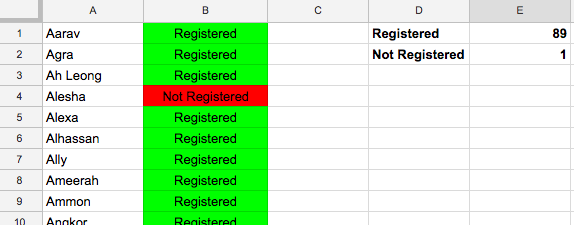
Essentially what this does is it checks the value in A1 (or A2, A3, A4, etc when you copy it in every line) and sees if it has turned up in Column B in the initial responses. So all I had to do was get a list of all of our 90 learners and put it in Column A and then copy this formula into all of Column B, add a quick conditional formatting (Green if it's Registered, Red if it's Not Registered) and this is what we get:
All but one of our learners have registered this week (and the one who hasn't is in Queenstown).
So that's how we're currently organizing our workshops. It seems like a lot, but once set up, it's very easily copied into a second, third, etc week. Hopefully this has been helpful. I'll make an attempt to share more of my organizational tips on here and if anyone has any ideas of how to improve this system, I'd love to hear from you!